
Mobile Data Versus Wi-Fi: When Each One Actually Serves You Better

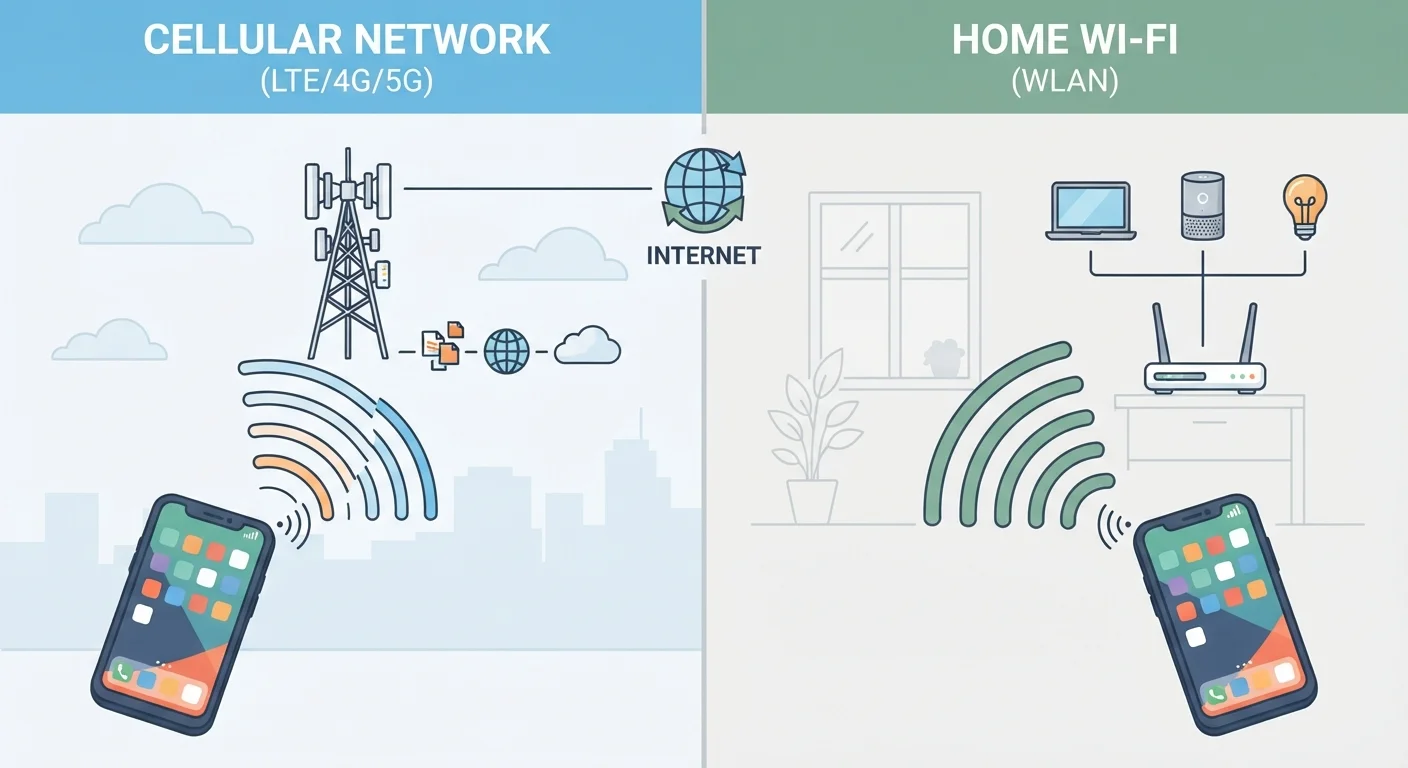
It's not always obvious which connection to rely on. This comparison covers speed, cost, reliability, and the situations where each shines.
Our Verdict
Neither mobile data nor Wi-Fi wins outright. Home Wi-Fi handles heavy, stationary use well and costs nothing beyond your internet bill. Mobile data handles movement and fills gaps when Wi-Fi is unavailable or untrustworthy. Using both deliberately, rather than defaulting to whatever the phone picks, gets the most out of each.
| Best for | Recommended |
|---|---|
| Streaming video, video calls, or large downloads at home | Home Wi-Fi |
| Navigation, browsing, and app use while commuting or traveling | Mobile data |
| Sensitive tasks like banking or account logins in public | Mobile data |
| Casual browsing in a trusted public venue with a known network | Public Wi-Fi (with awareness of risks) |
Key takeaways
- Wi-Fi is generally faster and cheaper for heavy tasks like video streaming or large downloads at home.
- Mobile data is more reliable when moving around or when a public Wi-Fi network is congested or untrusted.
- Security matters: home Wi-Fi and mobile data are both reasonably safe; public Wi-Fi carries more risk.
- Your data plan and available signal strength should guide the choice in ambiguous situations.
- Switching between the two consciously, rather than leaving it to auto-connect, puts you in control.
How each connection actually works
Mobile data travels over cellular networks. Your phone connects to the nearest cell tower, which links to your carrier's infrastructure and out to the internet. The signal follows you as you move, handing off between towers without you doing anything.
Wi-Fi works differently. A router in your home or a business receives the internet connection through a cable (usually fiber or coaxial), then rebroadcasts it wirelessly over a short range, typically up to a few hundred feet indoors. Your device has to be within that range and connected to the specific network.
The practical difference is mobility versus capacity. Cellular is built to cover large areas with many moving users. Wi-Fi is built to serve a fixed location with higher throughput. That distinction shapes when each one makes sense.
Speed and reliability compared
Home Wi-Fi connected to a broadband plan will usually outpace mobile data for raw speed. A typical home internet plan delivers download speeds that comfortably handle 4K video, simultaneous streaming on multiple devices, and large file transfers. Mobile data speeds vary considerably depending on whether you are on 4G LTE or 5G, how far you are from a tower, and how many people are on the same cell at the same time.
5G can be fast, sometimes faster than many home connections, but coverage is uneven. Rural areas and building interiors often fall back to 4G LTE or weaker signals. Mobile speeds also slow during peak hours when many users share the same tower.
Wi-Fi has its own reliability problems. Evening slowdowns on Wi-Fi can result from network congestion at your internet service provider's level, not just your router. Public Wi-Fi is especially prone to congestion because many unknown devices share the same access point.
| Mobile data | Home Wi-Fi | Public Wi-Fi | |
|---|---|---|---|
| Speed | Variable, 4G to 5G | Generally fast and consistent | Often slow and congested |
| Mobility | Full mobility | Fixed location only | Fixed location only |
| Cost per GB | Counts against data cap | Included in flat monthly fee | Usually free to use |
| Security | Encrypted by carrier | Secure with strong password | More risk on open networks |
| Reliability | Depends on tower coverage | Stable when ISP is stable | Highly variable |
| Best for | On-the-go and sensitive tasks | Heavy home use | Casual browsing in known venues |
Cost and data caps
Home Wi-Fi carries a fixed monthly cost regardless of how much you download. Once you pay for the plan, streaming a four-hour movie costs the same as loading a single webpage. That makes it the practical choice for any heavy data task done at home.
Mobile data plans usually come with a cap. Once you hit that cap, many carriers throttle your speed significantly for the rest of the billing cycle, even if they advertise the plan as "unlimited." Streaming video, downloading large app updates, and video calling all consume data quickly. A one-hour HD video stream can use 2 to 3 gigabytes on its own.
If you are near the end of your monthly allotment, switching to Wi-Fi for data-heavy tasks preserves your mobile data for when you actually need it on the go.
Security considerations
Home Wi-Fi, when protected with a strong password and modern encryption (WPA2 or WPA3), is a reasonably secure environment for everyday tasks including banking and account management.
Mobile data traffic travels encrypted between your phone and the carrier's network, which makes it harder for someone nearby to intercept. That is one reason security professionals often suggest using mobile data over public Wi-Fi for sensitive tasks.
Public Wi-Fi is the situation that deserves the most attention. Open networks, or networks where many strangers share the same password, make it easier for someone on the same network to observe unencrypted traffic. Most websites now use HTTPS, which encrypts the content of your connection, but the risk is not zero. See what the actual risks of public Wi-Fi are for a grounded breakdown of which threats are real and which are overstated. For a practical angle on when connecting is worth it, this look at public Wi-Fi convenience and risk covers the everyday tradeoffs.
Situations where the choice is clear
A few scenarios make the decision straightforward.
- Streaming or downloading at home: use Wi-Fi. It is faster, does not draw from your data plan, and the connection is stable.
- Navigation while driving or riding: use mobile data. Wi-Fi is not available in a moving vehicle.
- Video call from a coffee shop: mobile data is more consistent and more private than the shop's open network.
- Software updates on your phone: do these on Wi-Fi. Updates are often several gigabytes and will drain a data plan fast.
- Quick email check at an airport: either works, though mobile data avoids any uncertainty about the airport network.
The less obvious situations are when you are somewhere with both available and neither is obviously better. In those cases, check your remaining data for the month and consider what you are about to do. A quick map search costs almost nothing; a podcast download could cost several hundred megabytes.
Check your auto-connect settings
Most phones are set to join any saved Wi-Fi network automatically. That is convenient at home but can mean your phone silently connects to a weak or congested public network when mobile data would serve you better. Review your saved networks periodically and remove ones you no longer trust or use. On both Android and iOS, you can turn off auto-join for specific networks without deleting them entirely.
The content on this site is for informational purposes only and is not a substitute for professional advice. Always consult a qualified professional for guidance specific to your situation.